




Telegram review
 Analysis by GetAllApps
I notice Telegram most when my connection changes: a message that is ready to send waits for signal, a busy group keeps moving once I’m back online, and a large conversation can make a weak connection feel especially obvious. That makes it a useful app to judge not only by its chat tools, but by how well its busy, cloud-oriented style fits the places where I actually use my phone. My overall impression is that it works best for people who move between one-to-one chats, groups, and public channels and can accept that the experience depends on a reliable network.
Messages work best when the connection keeps up
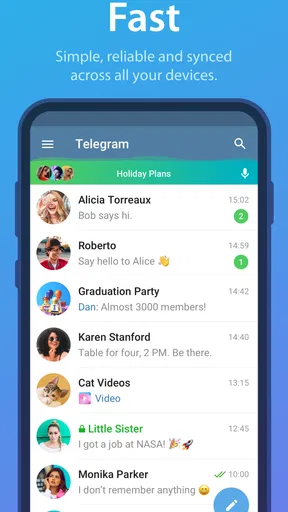
Telegram is a communication app from Telegram FZ-LLC, and I think of it as a flexible messaging space rather than a simple replacement for texting. It handles direct conversations, large group discussions, and channel-style updates in one interface. That breadth is useful, but it also means the app can feel busier than a messenger used only for quick notes to family or friends.
In everyday use, network quality affects more than whether a message sends. It also shapes how quickly conversations catch up, whether media is ready when I open it, and how responsive a rapidly moving group feels. With a steady connection, switching among chats and channels feels natural. On a weak mobile signal, I’m more likely to notice pauses and waiting, especially when a conversation contains lots of media.
A practical habit is to treat important messages differently from casual group chatter. If something needs an immediate response, I check that it has actually gone through rather than assuming the tap was enough. For a long update or a file, I wait for a more dependable connection when that is convenient. This is not a flaw unique to Telegram; it is the trade-off of using an internet-based messenger for communication that people may expect to be instant.
Why busy groups feel different
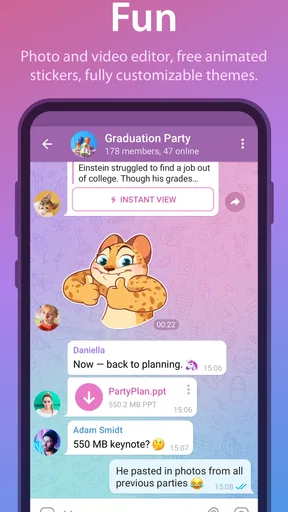
Telegram’s group and channel use is a major reason to choose it over a basic messaging app. A group can serve as a working discussion, a neighborhood noticeboard, or a place where friends share plans. Channels are better suited to updates that people mainly read rather than answer. Keeping both kinds of spaces in one app saves me from juggling separate tools, but it can also create a steady stream of incoming material.
For a real-world example, imagine coordinating a weekend outing. A small group can settle on a time, while a channel or larger community shares broader announcements. If I’m on a train with uneven reception, I can still open the app and see what is available, but I should not assume every new post or attachment will arrive immediately. I find it helpful to check the key details before leaving a dependable connection, rather than relying on a last-minute refresh.
Another useful distinction is between conversation and broadcast. When a space is meant for discussion, a group keeps replies together; when the goal is one-way updates, a channel is less noisy for readers. Choosing the right space matters because connection interruptions are more frustrating when dozens of unrelated messages are arriving at once. A well-organized community makes Telegram feel purposeful; an unfiltered one can make it feel like an endless feed.
Using it while moving through the day
On a phone, I value that Telegram can cover quick personal messages as well as longer-running communities. That makes it handy during a commute, between errands, or while coordinating with people who are not all available at the same time. The catch is that mobile connectivity is uneven by nature. A conversation that feels instant on home Wi-Fi may be slower in a basement, a crowded station, or a rural stretch of road.
When I know I’ll be moving through patchy coverage, I try to avoid making the app my only source for time-sensitive instructions. I’ll confirm a meeting place before setting off, or make sure a crucial detail is already visible in the conversation. That small change in habit is more useful than repeatedly reopening a chat and hoping a delayed update appears.
Telegram may also suit someone who follows several interest groups or public channels, but that pattern can make the app feel demanding on a small screen. I recommend being selective about which spaces deserve attention. Muting or leaving low-value conversations, where those controls are available, is a sensible way to make a large messaging environment more manageable. The point is not to keep every stream active; it is to make the spaces you rely on easier to find and follow.
Compared with the usual alternatives, Telegram’s appeal is its mix of private chats, groups, and broadcast-style channels. A conventional SMS app is often simpler for reaching someone without asking them to join another online community, while a more minimal messenger may be calmer for people who only want direct conversations. Telegram is the better fit when the people and communities I need are already there and I want those different kinds of communication together.
What happens when a message seems stuck
When a message appears delayed, I first check the obvious cause: whether the phone has a usable connection. If other apps are also struggling, repeatedly tapping send is unlikely to help. I wait for service to return, revisit the conversation, and confirm the message’s state before sending it again. That last step helps avoid accidental duplicates when the connection recovers after a delay.
For media, patience is often more useful than treating a slow preview as a broken chat. A text update may be readable while an image or other attachment takes longer to become available. If the material matters immediately, I ask the sender to summarize the essential detail in text or share it again when both sides have a more stable connection. That is a practical workaround, not a promise that every attachment will behave the same way.
There is also a social side to recovery. A message may reach a group later than expected, which can make a reply seem out of sequence. In a fast-moving discussion, I read the nearby messages before responding instead of assuming the newest item is the whole story. This is particularly useful when coordinating plans: if a change arrives late, I confirm the final time or location directly rather than relying on a partial view of the chat.
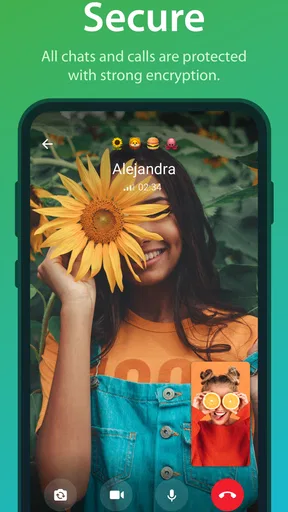
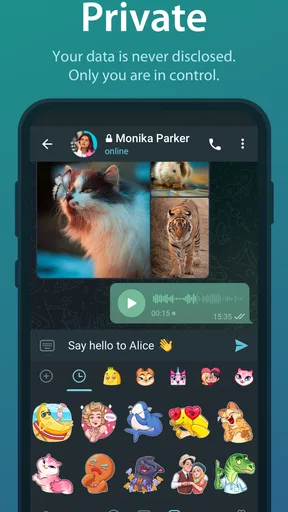
Telegram’s security focus is part of its identity, but I would not treat the word “secure” as a reason to ignore how a particular conversation is configured. Before sending sensitive material, I check that I’m using the conversation type and settings I intend. People who need a very specific privacy setup should learn those controls before relying on them for important exchanges. That is a more careful approach than assuming every chat in any messenger works identically.
Managing data without losing the thread
Because Telegram can bring together active groups, channels, and media, it is worth paying attention to how much content the app is asked to load over a mobile connection. I avoid opening every large item immediately when I’m on limited data, and I save heavier browsing for Wi-Fi when practical. This is a useful routine for frequent channel readers, not just for people with unusually tight data limits.
The trade-off is convenience. Opening media right away makes a conversation feel richer, but waiting until a better connection can interrupt the flow. I decide based on whether the content is useful now: a photo that answers a practical question may be worth loading, while a stream of casual clips can wait. Keeping that distinction in mind helps Telegram remain a messaging tool instead of turning every spare moment into a download session.
Notifications deserve similar attention. A phone that alerts for every group and channel can make it seem as though the app is constantly demanding a connection and attention. I recommend prioritizing direct conversations and the communities that genuinely matter, then reducing noise from the rest. This improves the experience even when the network is excellent, because it makes important messages easier to notice.
Telegram is free to download, though it includes in-app purchases ranging from around thirty-one cents to about two hundred ninety dollars and ninety-nine cents per item. I would not choose it on the assumption that every optional purchase is necessary; the basic reason to install it is whether its communication spaces match the people and groups I want to reach. The app is rated Mature 17+, so that age guidance is worth considering when deciding whether it is suitable for a younger user.
Who I would recommend it to
I’d recommend Telegram to someone whose communication life extends beyond a few private chats: people who coordinate groups, follow channel updates, or want a single place for several kinds of conversation. Its long presence in the category is reflected in its scale: it has been available since September 6, 2013, and has over one billion installs. It has an average rating of 3.8 from around seventeen million ratings, alongside roughly 186,000 written reviews. Those figures suggest broad reach, but they do not guarantee that its busy style will suit every person.
I’d be more hesitant to recommend it to someone who mainly needs straightforward texting, dislikes large online communities, or often relies on unstable connectivity for urgent communication. A simpler messenger or ordinary text messaging may be a better fit when the priority is a quiet, direct exchange rather than a mix of chats and channels. If the people a reader wants to contact are not on Telegram, its broad feature set cannot solve that basic problem.
For anyone trying it, I suggest starting with a few trusted conversations, then adding groups and channels selectively. Test how it feels on both Wi-Fi and mobile data, and decide which notifications deserve to come through. That gives a clearer sense of whether its pace and organization work for you than joining many communities at once. I also recommend checking the intended privacy settings before sharing anything sensitive.
My verdict is that Telegram is strongest when a dependable connection meets an active, well-curated set of chats and channels. I like its range and the way one app can handle both small conversations and larger communities, but I would not call it the calmest choice or the safest assumption for time-critical messages in a dead zone. If you want that breadth and are willing to manage notifications, media, and connectivity thoughtfully, it is an easy app to recommend. If you want only simple, low-noise texting, I’d choose something more focused.
Pros and cons
Pros
- Messages sync across devices through cloud storage.
- Large groups can host many members.
- Secret Chats offer end-to-end encryption.
- Channels make public broadcasting easy.
- Bots add useful automated features.
Cons
- Secret Chats are not available on every device.
- Cloud chats are not end-to-end encrypted by default.
- Public groups and channels may contain harmful content.
- Finding the right privacy settings can take time.
- Large file transfers can consume substantial data.


